

Most “best firewall plugin for WordPress” articles read like they were written by the plugin companies themselves. Ten logos, ten five-star ratings, an affiliate link under each one, and a conclusion that somehow recommends whichever tool pays the highest commission. We build and maintain WordPress sites for a living, so we are going to do this differently.
This guide tells you what a WordPress firewall plugin genuinely protects you from, where it quietly fails, and which tool actually fits your situation. Some of what follows will contradict the top-ranking posts. That is on purpose. If you only remember one thing, remember this: the strongest protection is rarely a single plugin. It is a setup. We will show you how to build it.
What a WordPress Firewall Plugin Actually Does
A WordPress firewall, often called a Web Application Firewall or WAF, sits between visitors and your website and reads every request coming in. Legitimate visitors pass through. Requests that match known attack patterns get blocked before they can do damage.
According to OWASP, the most common web attacks a firewall is meant to catch include:
- SQL injection, where an attacker tries to run database commands through a form or URL
- Cross-site scripting (XSS), where malicious scripts get injected into pages
- Brute force attacks, where bots try thousands of username and password combinations
- Malicious bots and scrapers that hammer your server and steal content
- Exploit payloads aimed at a known hole in a specific plugin or theme
That last point matters more than the others combined. The large majority of hacked WordPress sites are not broken into through some genius zero-day attack. They are compromised through an outdated plugin, an outdated theme, or a weak login. A firewall’s real day job is buying you time and blocking the automated exploit traffic that scans the entire web looking for those weak spots.
The one distinction that decides everything
Before you compare a single plugin, you need to understand that WordPress firewalls come in two very different shapes. This is the part most listicles gloss over, and it is the single most useful thing in this guide.
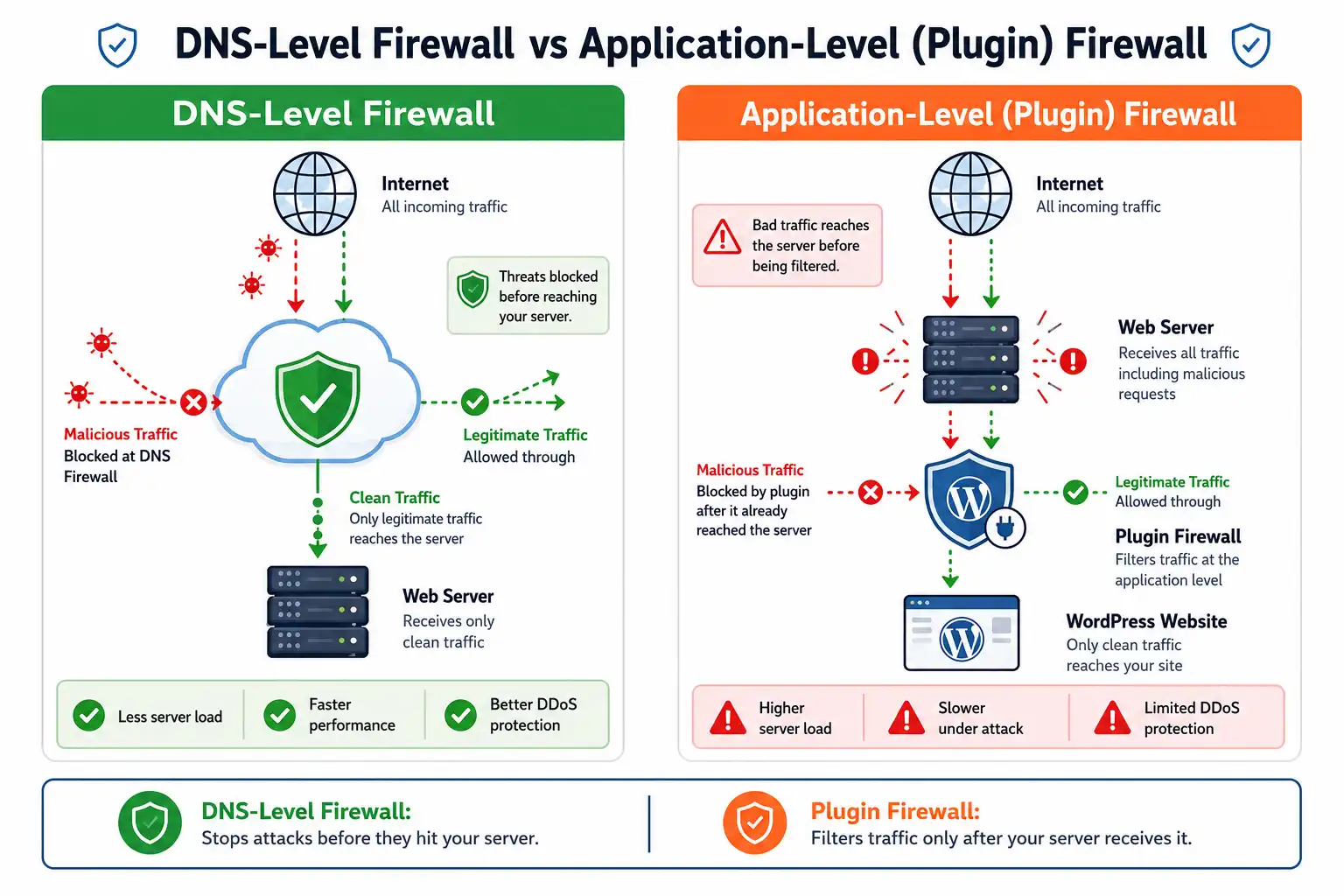
DNS-level firewalls (cloud based)
With a DNS-level firewall, you change your domain’s DNS so traffic flows through the provider’s global network first. The provider inspects every request out at the edge, blocks the bad ones, and forwards only clean traffic to your server. Cloudflare and Sucuri work this way.
Why this is powerful:
- Malicious requests never touch your server, so they never burn your CPU or memory
- It can absorb large traffic floods, which is the only realistic way to survive a DDoS
- It usually comes bundled with a CDN, so pages load faster too
The trade-off is that you are routing your traffic through a third party, and setup means a DNS change rather than a one-click install.
Application-level firewalls (plugin based)
An application-level firewall runs as a plugin inside WordPress. It inspects requests after they have already arrived at your server and after PHP has started working. Wordfence and All-In-One Security work this way.
Why people still choose it:
- Dead simple to install from your WordPress dashboard
- It understands WordPress deeply, so it can catch WordPress-specific attack patterns a generic filter might miss
- No DNS changes, no dependency on an outside proxy for your traffic to flow
The honest downside, which Cloudflare’s own documentation and independent testers both confirm, is that the malicious request already reached your server before the plugin evaluated it. Your server still did the work. That has real consequences we will get into below.
The Uncomfortable Truths Other Guides Skip
If you want to pick the right tool, you have to know where these tools stop working. Here is what the sponsored posts leave out.
A plugin firewall cannot truly stop a DDoS
This surprises people. A firewall that lives inside WordPress can only act once a request has already hit your server. During a Distributed Denial of Service attack, thousands of requests flood in at once. Even if your plugin blocks every single one, your server still has to receive them, spin up PHP, and process the block. On a large enough flood, the server falls over anyway.
Only a firewall that filters traffic before it reaches your server, meaning a DNS-level service like Cloudflare or Sucuri, gives you real WordPress DDoS protection. If DDoS is a genuine worry for you, no in-dashboard plugin alone will save you.
“Free” often means a 30-day blind spot
Wordfence Free is genuinely capable, and we recommend it often. But you should understand exactly what “free” costs you here. Wordfence’s free tier receives new firewall rules and malware signatures on a 30-day delay after paying customers get them. Wordfence’s own materials rate the free firewall at roughly a third as effective as the premium feed.
Think about what that delay means in practice. When a serious vulnerability is disclosed in a popular plugin, attackers start scanning for it within hours. Paid users are protected immediately. Free users sit exposed for a month while the attack wave passes through. For a hobby blog, that is a fine risk to accept. For a store taking payments, it is not.
A firewall is a layer, not a cure
We say this to clients constantly. A firewall does not update your plugins, it does not enforce strong passwords, it does not take backups, and it does not replace decent hosting. If your site gets hacked, cleanup and recovery can eat days. We wrote about the realistic timeline in our piece on how long it takes to recover from a WordPress hack, and the short version is that prevention across several layers is far cheaper than any single tool.
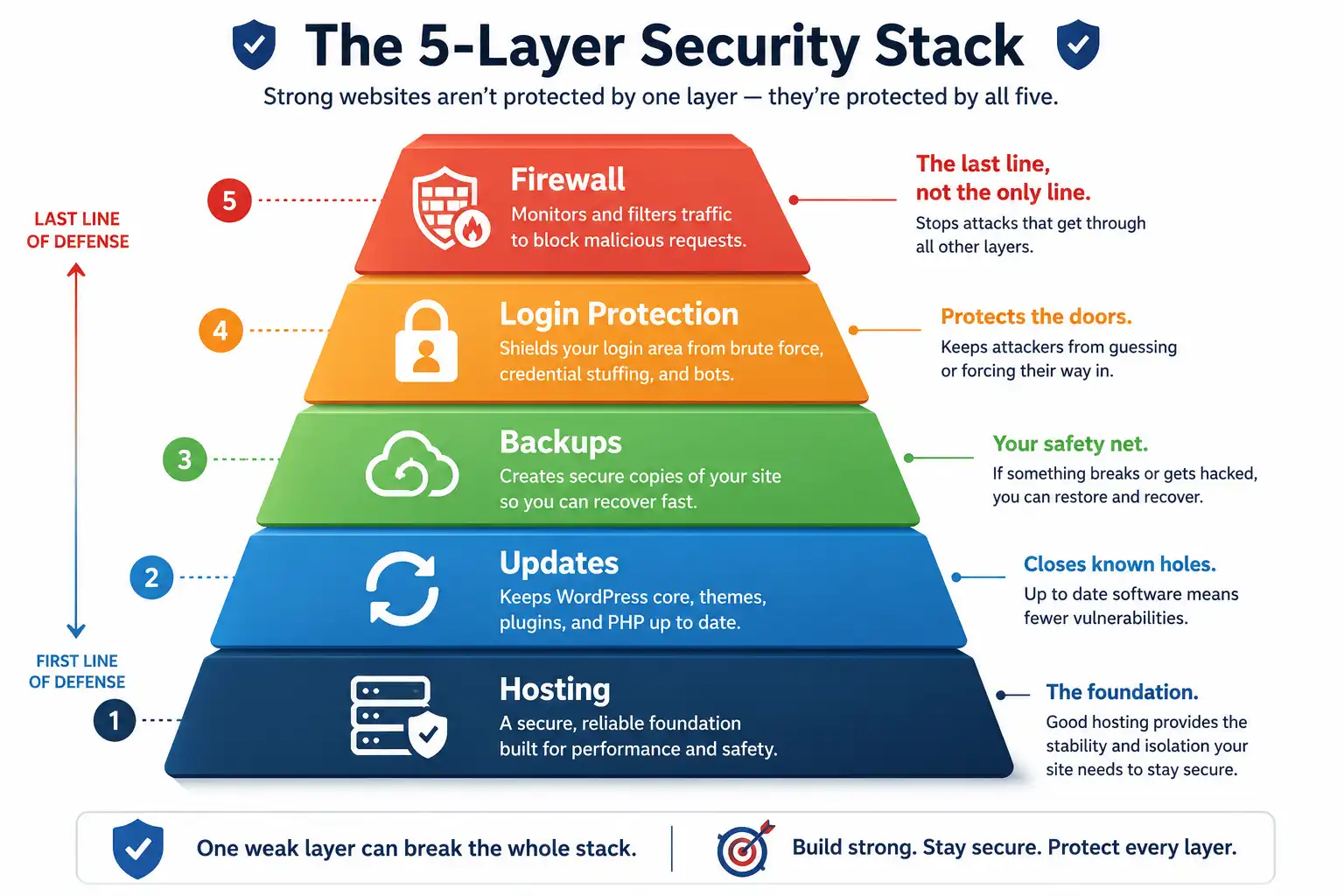
The genuinely secure sites we manage all share the same boring habits: current software, strong logins with two-factor, reliable backups, quality hosting, and a firewall on top. The firewall is the last layer, not the only one.
The Best WordPress Firewall Plugins in 2026
With the ground rules set, here are the tools worth your attention, what each is actually good at, and where each one lets you down. Pricing is accurate as of 2026. Security vendors change their plans often, so confirm the current number on the official site before you buy.
1- Wordfence
Wordfence, built by Defiant, is the name most people reach for first, and for good reason. It is a WordPress-only security suite with a firewall, a malware scanner that compares your core files against known-good versions, and strong login protection including two-factor authentication.
Where Wordfence wins:
- The free version includes a working firewall, a real malware scanner, and login security that some competitors charge for
- It gives you deep visibility into live traffic, so you can watch who is probing your site and block IPs by hand
- Because it runs on your server, its firewall cannot be bypassed over the open internet
Where it falls short:
- It is application-level, so it offers no CDN and cannot provide real network-layer DDoS protection
- The free tier’s 30-day rule delay is a meaningful gap for high-value sites
- On budget shared hosting, its scans can noticeably raise server load
Pricing: Free tier available. Premium runs $149 per year for a single site. Wordfence Care, which adds hands-on setup and incident help, is $590 per year. Wordfence Response, built for high-stakes sites needing a one-hour response time, is $1,250 per year. Note that a complex malware cleanup is charged separately if you are not on Care or Response. (Source: Wordfence pricing.)
Best for: Site owners who want a trusted, WordPress-native tool with a strong free option, and who either have other DDoS protection or do not need it.
2- Sucuri
Sucuri takes the opposite approach to Wordfence. Its firewall is cloud based and sits at the DNS level, filtering traffic before it ever reaches your server. Its rules are tuned specifically for WordPress and WooCommerce rather than being generic.
Where Sucuri wins:
- Malicious traffic is blocked at the edge, so your server stays free to serve real customers
- Every paid plan includes unlimited professional malware removal, which is the standout feature. If you get hacked, their team cleans it, however many times it happens
- It includes a CDN, DDoS mitigation, and blocklist removal if Google ever flags your site
- Virtual patching means that when a plugin vulnerability is disclosed, Sucuri can block the exploit at the firewall within hours, even before you update
Where it falls short:
- The entry price is higher than a free plugin, and you are routing traffic through Sucuri’s network
- Setup requires a DNS change, which is a small hurdle for non-technical owners
Pricing: Paid plans run from roughly $199.99 per year (Basic) to $499.99 per year (Business), with unlimited malware cleanup on every tier. (Source: Sucuri.)
Best for: Business-critical sites, stores, and anyone who would rather pay for peace of mind than manage an incident themselves.
3- Cloudflare
Cloudflare is a bit of a special case, because its free plan alone protects a lot of sites. It is a DNS-level network that gives you a firewall, a global CDN, and unmetered DDoS protection across all plans, including the free one.
Where Cloudflare wins:
- Genuinely useful free tier with DDoS protection that plugin firewalls cannot match
- Massive global network, so your site stays fast and stays up during traffic spikes
- Flat pricing on paid plans, so you are not penalised as your traffic grows
Where it falls short:
- Its firewall rules are generic rather than WordPress-specific, so some WordPress-targeted attacks can slip through on the free tier
- The managed WAF rulesets that add smarter filtering start on the paid Pro plan
- It does no malware scanning, no file-change monitoring, and no cleanup
Pricing: Free plan available with DNS-level firewall, CDN, and DDoS protection. The Pro plan, which adds managed WAF rules, is roughly $20 to $25 per month. Business sits around $250 per month. (Source: Cloudflare plans.)
Best for: Almost everyone as a base layer, especially paired with a WordPress-aware plugin behind it.
4- MalCare
MalCare was built to fix the biggest complaint about Wordfence, which is server load. It runs its heavy scanning on its own servers rather than yours, so your site does not slow down during a scan. It is WordPress-specific and offers one-click automatic malware removal.
Where MalCare wins:
- Scanning happens off your server, so there is little to no performance hit
- Auto-removal of malware without waiting on a support ticket
- Learns from a large network of sites, which sharpens its threat detection
Where it falls short:
- It is a subscription product with no truly free firewall tier of note
- Newer and less widely deployed than Wordfence or Sucuri
Best for: Owners on managed hosting who want strong protection without the resource drag of on-site scanning. Confirm current pricing on the official site.
5- All-In-One Security (AIOS)
AIOS, from the team behind UpdraftPlus, packs a firewall, brute force protection, login hardening, file integrity monitoring, and spam control into one plugin, and organises features into basic, intermediate, and advanced tiers so beginners are not overwhelmed.
Where AIOS wins:
- Feature-rich free version with a friendly interface
- A security score that nudges you toward safer settings
- Good login and brute force protection out of the box
Where it falls short:
- Like Wordfence, it is application-level, so no CDN or true DDoS defence
- Advanced firewall rules can occasionally break site functionality if enabled without testing
Pricing: Free version available. Premium starts around $70 per year. Confirm the current figure before buying.
Best for: Beginners who want a broad free security toolkit with sensible defaults.
6- NinjaFirewall
NinjaFirewall deserves a mention because it solves the application-level firewall’s biggest weakness in a clever way. Instead of loading like a normal plugin, it hooks into PHP before WordPress core, its themes, and its plugins even start running. That means it can filter and block attacks earlier, using fewer server resources than a standard plugin firewall.
Best for: Technically comfortable users who want application-level filtering with less overhead. It is not the friendliest option for beginners.
Solid Security (formerly iThemes Security)
Solid Security is strong on login hardening, brute force protection, and two-factor authentication. Be clear about what it is, though. It leans more toward login and access security than toward a full traffic-inspecting WAF. Many owners run it alongside a dedicated firewall rather than instead of one.
WordPress Firewall Plugins Compared
| Plugin | Firewall type | DDoS protection | Malware scan | CDN | Free tier | Paid from (2026) |
|---|---|---|---|---|---|---|
| Wordfence | Application (PHP) | No (real) | Yes | No | Strong | $149 / year |
| Sucuri | DNS-level (cloud) | Yes | Yes | Yes | No | ~$199.99 / year |
| Cloudflare | DNS-level (cloud) | Yes (all plans) | No | Yes | Strong | ~$20–25 / month |
| MalCare | Cloud + WP plugin | Partial | Yes (off-site) | Add-on | Limited | Subscription |
| AIOS | Application (PHP) | No (real) | Yes | No | Strong | ~$70 / year |
| NinjaFirewall | Application (pre-core) | No (real) | Basic | No | Yes | Pro edition |
| Solid Security | Login/access focus | No | Basic | No | Yes | Pro edition |
Read that DDoS column carefully. It is the clearest illustration of why the type of firewall matters more than the brand on the box.
How to Actually Choose, By Situation
Star ratings are useless without context. Here is how we would advise a client, based on what they run.
If you run a small blog or brochure site
You do not need to spend money. Put Cloudflare Free in front for DDoS protection and a speed boost, and run Wordfence Free behind it for WordPress-aware monitoring and login security. This pairing beats most single paid plugins, and it costs nothing. Just keep your plugins updated so the 30-day rule delay never becomes a problem.
If you run WooCommerce or take payments
This is not the place to cut corners. You are handling customer data and money, and downtime costs you sales directly. Go with Sucuri, or at minimum Wordfence Premium so you get real-time rules instead of the delayed feed. The unlimited cleanup on Sucuri’s plans is worth it the first time something slips through. A slow or hacked checkout also quietly wrecks conversions, which is part of why we treat security as connected to performance in our guide to speeding up your WordPress site.
If you manage many client sites
Look at cloud-managed options with central dashboards and volume pricing. Sucuri and MalCare both scale better across a portfolio than per-site plugin licences, and offloaded scanning keeps every client site fast. If you build custom tools for clients, it also helps to understand how WordPress plugins are built so you can vet third-party code before it ever goes near a client site.
If you are on cheap shared hosting
Be careful with heavy application-level plugins here. Wordfence scans can push a tight shared server to its limits. Lean on Cloudflare Free at the edge so most bad traffic never reaches your server, and pair it with a lighter plugin such as NinjaFirewall or a well-configured AIOS. Better hosting solves a lot of this on its own, which is why we put together our rundown of reliable WordPress hosting.
The Setup We Recommend for Most Sites
Here is the layered approach we actually deploy, rather than betting everything on one plugin.
- Put a DNS-level firewall in front. Cloudflare Free is the easy starting point. This handles DDoS and filters a lot of junk before it reaches your server.
- Run a WordPress-aware plugin behind it. Wordfence or AIOS watches for WordPress-specific attacks, monitors file changes, and hardens logins.
- Lock down login. Turn on two-factor authentication, limit login attempts, and rename or protect the default login URL. A huge share of attacks are just bots guessing passwords.
- Keep everything current. Core, themes, and plugins. This is the boring layer that prevents most real incidents. For more on why the platform itself makes this manageable, see our overview of keeping a WordPress site secure and maintained.
- Back up off-site, automatically. So that if the worst happens, recovery is measured in minutes, not days.
If managing all of that sounds like more than you want to take on, that is exactly the kind of ongoing work our team handles through our WordPress maintenance and security service.
Firewall Settings People Get Wrong
A firewall you configure badly can be worse than none, because it lulls you into thinking you are safe. The mistakes we see most often:
- Turning on every advanced rule at once. Some aggressive rules break legitimate site features. Enable, test, then move to the next.
- Never checking the logs. Your firewall is telling you who is attacking you and how. A clean dashboard does not always mean a clean site.
- Blocking whole countries carelessly. Country blocking can help, but it also blocks real customers and, sometimes, search engine crawlers. Know who your audience is first.
- Assuming the firewall handles malware removal. Most do not clean an infection, they only block traffic. You still need scanning and a recovery plan.
- Leaving the default login page wide open. No firewall fully compensates for weak login security. Fix the front door.
How a Firewall Affects Speed and SEO
Security and search rankings are more connected than people assume. Google flags and can deindex hacked sites, so a breach is not only a security event, it is an SEO event that can wipe out months of work. A DNS-level firewall with a built-in CDN can actually make your site faster, since it caches content close to visitors and filters junk traffic before it wastes your resources.
Application-level plugins are the opposite story. They add a small amount of processing to each request, usually in the range of 20 to 50 milliseconds on decent hosting, and more during full scans on weak servers. That is not a reason to skip protection. It is a reason to pair a heavier plugin with a good host and, ideally, an edge firewall doing the bulk of the filtering.
Frequently Asked Questions
Do I actually need a firewall plugin for WordPress?
Yes, in almost every case. WordPress powers a large share of the web, which makes it a constant target for automated attacks. Even a small site gets probed daily by bots. A firewall blocks that automated traffic, which is most of what hits you.
Is Cloudflare’s free plan enough on its own?
For a simple site, it goes a long way. It handles DDoS and filters plenty of bad traffic. But its rules are generic, and it does no malware scanning. Pairing it with a WordPress-aware plugin closes the gaps, which is why we recommend the two together.
Wordfence or Sucuri, which is better?
They solve different problems. Wordfence is an application-level plugin with a strong free tier that runs on your server. Sucuri is a cloud firewall that blocks attacks before they reach you and includes unlimited malware cleanup. For a business-critical site, Sucuri’s approach and cleanup guarantee are usually worth the price. For a budget-conscious site with other protection in place, Wordfence Free or Premium is excellent value.
Does a firewall plugin slow down my WordPress site?
An application-level plugin adds a little overhead per request, more during scans. A DNS-level firewall with a CDN usually makes your site faster instead of slower, because it filters and caches traffic at the edge.
Is the free version of Wordfence safe to rely on?
It is capable, but its firewall rules arrive 30 days after paying users get them. For a hobby site that stays updated, that is an acceptable trade. For a store or a site holding sensitive data, upgrade to real-time rules or use a cloud firewall.
Will a firewall clean my site if it is already hacked?
Usually not. Most firewalls block incoming attacks but do not remove an existing infection. You need a malware scanner and a cleanup process for that. Sucuri includes professional cleanup on its plans, which is one of its biggest draws.
The Bottom Line
The best firewall plugin for WordPress is not a single winner you install and forget. For most sites, the right answer is a DNS-level firewall like Cloudflare in front, plus a WordPress-aware plugin like Wordfence or AIOS behind it, sitting on top of good hosting, current software, strong logins, and real backups. If you run a store or anything mission-critical, Sucuri is the cleaner all-in-one choice, mostly because of its cloud firewall and unlimited cleanup.
Pick based on your situation, not on a star rating in a sponsored roundup. And remember that the firewall is your last line of defence, not your only one. Get the layers underneath it right, and the plugin on top finally does what it is supposed to do.
Sources
- OWASP, Web Application Attacks and WAF fundamentals: https://owasp.org/
- Wordfence official pricing and product documentation: https://www.wordfence.com/products/pricing/
- Sucuri website firewall and platform: https://sucuri.net/
- Cloudflare plans, WAF, and DDoS documentation: https://www.cloudflare.com/plans/
- WordPress.org plugin directory and hardening guidance: https://wordpress.org/documentation/article/hardening-wordpress/
Pricing and features reflect publicly available information as of 2026. Security vendors update plans frequently, so confirm the current details on each official site before purchasing.